GDELT on ClickHouse: Day 4
Timing the 2026 bulk load two ways (and getting two answers), going live on Cloud Run, and a first pass at dashboards.
Day 4
Step 4a: Bulk load historical data (continued)
Previously on GDELT demo building, I started bulk loading data from 2026. It succeeded, obv, but how long did it take? I’m not totally sure.
There are two sources of truth. The “easy” one is from the ingest_log table that the ingest code creates, which writes each file timestamp along with a processed_at timestamp. So, the easy method is just subtracting the min from the max to see the runtime.
SELECT dateDiff('minutes', min(processed_at), max(processed_at))
FROM gdelt.ingest_log

Query id: d6e9ebcc-cec5-411d-9723-31cd00619623

   ┌─dateDiff('mi⋯cessed_at))─┐
1. │                      150 │
   └──────────────────────────┘

1 row in set. Elapsed: 0.004 sec. Processed 26.27 thousand rows, 105.08 KB (6.84 million rows/s., 27.38 MB/s.)
Peak memory usage: 562.62 KiB.
Well that’s easy! …yes, I had to look up docs on doing date math, but don’t we all.
But then I thought to myself, “I should be able to confirm this using the one of the system tables.” And that didn’t go as well.
system.query_log contains all the queries that are run. I go into the ClickHouse Cloud UI to see what it looks like, and there are multiple _{num} suffixed versions. Why? Buried in the system tables overview docs is a lil line reading:
Additionally, new versions of system tables may be created as a result of upgrades or changes to their schema. These versions are named using a numerical suffix.
Ah. So of course my data is in one/many of those, but who knows which. I’ll just query them all! …easily? Can I glob search? Why, yes I can.
Going through the query_log tables I noticed:
query_kind='Insert'is what I wanttypehas aQueryStartandQueryFinishthat presumably are exactly what they sound like they aretablesshows what tables were queried,hasAny()will let me query for both events and mentionsevent_timeis probably close enough for when the insert happened
So, filtering for the time window where this likely ran (I have been messing with the tables before and after):
SELECT dateDiff('minutes', min(event_time), max(event_time))
FROM merge('system', 'query_log_*')
WHERE (query_kind = 'Insert')
AND hasAny(tables, ['gdelt.events', 'gdelt.mentions'])
AND (event_date >= '2026-09-24')
AND (event_date <= '2026-09-26')
AND (type = 'QueryFinish')

Query id: 06a2f338-47c9-40c8-bf10-dc3893ff0169

   ┌─dateDiff('mi⋯vent_time))─┐
1. │                      276 │
   └──────────────────────────┘

1 row in set. Elapsed: 0.032 sec. Processed 581.56 thousand rows, 9.70 MB (18.25 million rows/s., 304.54 MB/s.)
Peak memory usage: 48.47 MiB.
That’s … different. I looked only at QueryFinish because I wanted to keep the query easy. I doubt that makes a difference, but trying to do it more “right”:
SELECT dateDiff('minutes', min_start, max_end)
FROM
(
    SELECT min(event_time) AS min_start
    FROM merge('system', 'query_log_*')
    WHERE (query_kind = 'Insert')
    AND hasAny(tables, ['gdelt.events', 'gdelt.mentions'])
    AND (event_date >= '2026-09-24')
    AND (event_date <= '2026-09-26')
    AND (type = 'QueryStart')
) AS t1,
(
    SELECT max(event_time) AS max_end
    FROM merge('system', 'query_log_*')
    WHERE (query_kind = 'Insert')
    AND hasAny(tables, ['gdelt.events', 'gdelt.mentions'])
    AND (event_date >= '2026-09-24')
    AND (event_date <= '2026-09-26')
    AND (type = 'QueryFinish')
) AS t2

Query id: 9a23575c-8a85-475c-bb33-4527c14ddda5

   ┌─dateDiff('mi⋯t, max_end)─┐
1. │                      276 │
   └──────────────────────────┘

1 row in set. Elapsed: 0.057 sec. Processed 1.16 million rows, 19.41 MB (20.39 million rows/s., 340.22 MB/s.)
Peak memory usage: 51.32 MiB.
Reassuringly the same? I honestly don’t know why they’re different, and so different at that; 126m, ~84% more. I also honestly don’t super care why. This probably had something to do with it:
SELECT
    event_time AS query_log,
    processed_at AS ingest_log
FROM
(
    SELECT min(event_time) AS event_time
    FROM merge('system', 'query_log_*')
    WHERE (query_kind = 'Insert')
    AND hasAny(tables, ['gdelt.events', 'gdelt.mentions'])
    AND (event_date >= '2026-09-24')
    AND (event_date <= '2026-09-26')
    AND (type = 'QueryStart')
) AS t1,
(
    SELECT min(processed_at) AS processed_at
    FROM gdelt.ingest_log AS ingest_log
) AS t2

Query id: b1c3b3a0-b584-4671-8954-547ca7735da3

   ┌───────────query_log─┬──────────ingest_log─┐
1. │ 2026-09-24 20:36:51 │ 2026-09-24 22:42:06 │
   └─────────────────────┴─────────────────────┘

1 row in set. Elapsed: 0.032 sec. Processed 607.83 thousand rows, 9.81 MB (19.13 million rows/s., 308.66 MB/s.)
Peak memory usage: 48.63 MiB.
126m diff. Right. So, my where on the query_log is dumb, and I should instead filter on event_time with a better estimate of my start time. No thanks. I already wasted a solid 45m messing around with this.
ANYWAY
SELECT
    formatReadableQuantity(event_count),
    formatReadableQuantity(mention_count)
FROM
(
    SELECT count() AS event_count
    FROM gdelt.events
) AS t1,
(
    SELECT count() AS mention_count
    FROM gdelt.mentions
) AS t2

Query id: 72a0ebe7-3bfe-4c32-aefb-222e37fe8571

   ┌─formatReadab⋯vent_count)─┬─formatReadab⋯tion_count)─┐
1. │ 27.80 million            │ 76.87 million            │
   └──────────────────────────┴──────────────────────────┘

1 row in set. Elapsed: 0.003 sec.
and (I cheated on this one for expedience sake)
SELECT
    database,
    `table`,
    formatReadableSize(sum(data_compressed_bytes)) AS compressed_size,
    formatReadableSize(sum(data_uncompressed_bytes)) AS uncompressed_size,
    round(sum(data_uncompressed_bytes) / sum(data_compressed_bytes), 2) AS compression_ratio
FROM system.parts
WHERE (database = 'gdelt')
AND (`table` IN ('events', 'mentions'))
AND (active = 1)
GROUP BY
    database,
    `table`

Query id: ac8a2427-c125-41fd-b569-6697a29fbac9

   ┌─database─┬─table────┬─compressed_size─┬─uncompressed_size─┬─compression_ratio─┐
1. │ gdelt    │ events   │ 2.13 GiB        │ 14.63 GiB         │              6.88 │
2. │ gdelt    │ mentions │ 1.82 GiB        │ 13.73 GiB         │              7.56 │
   └──────────┴──────────┴─────────────────┴───────────────────┴───────────────────┘

2 rows in set. Elapsed: 0.003 sec.
Not bad I guess?
Step 4: Make it live?!
> Claude, deploy the cloud run function
<many tokens>
⏺ The pipeline is live.
Huzzah!
Step 5: Do something (part 1)
At this point, I’m nearly done wanting to think about GDELT, but figure I can do a couple quick “analytics” using the Console Dashboarding capability. Frankly, it’s super limited and not at all what people should probably reach for when looking to build dashboards…another obvious rediscovery, no doubt.
I’ll spare you the pain of creating these 4 lil visualizations and the strange means I learned of filtering.
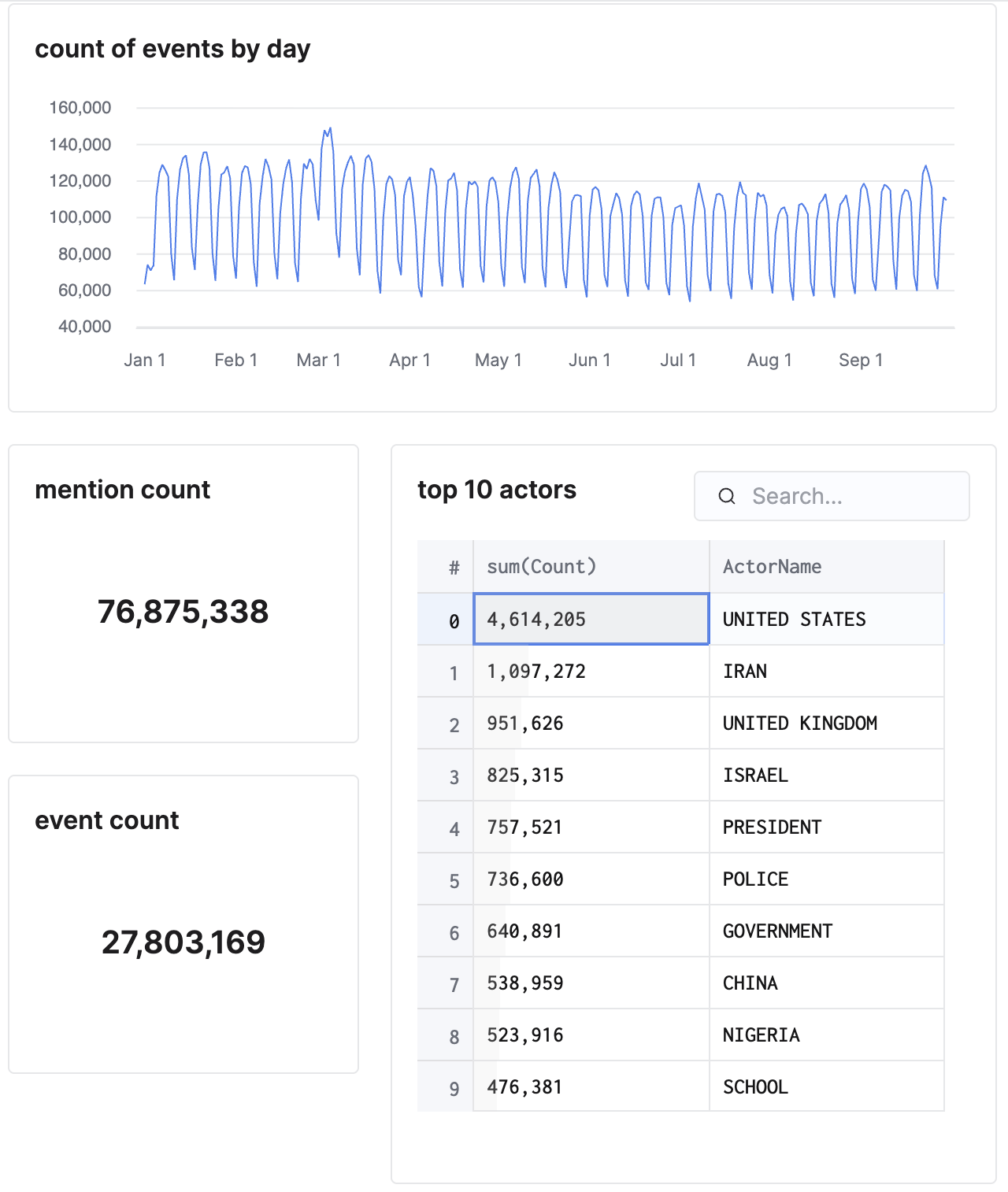
Yeah, not great, but the hardest part about working with data is asking the good questions that drive the queries that drive the schema. Day 5, maybe.
Also for Day 5, I need to make my MV better. The ActorName is one thing, but looking at that top 10, I’m going to want to filter by some of those type and group dimensions.